Is There an App, and Should You Download It?
Here's what changes everything: under UK rules, you must be age-verified before you can even see real-money slots, let alone download an app. That means every legitimate route starts with signing up, proving your age, and logging in — no shortcuts, no «download first, verify later». The UKGC register and licence number in the footer tell you the operator is legal; anything else is a clone or a scam.
Most players ask the same five questions in support: Is there a dedicated app? Can I add the game to my home screen? What's the difference between the operator's casino app and playing in Safari or Chrome? Are APK files safe? And how do I know I'm not installing a fake? This page walks through every installation path, the screens you'll actually see, what the app does, phone requirements, version notes, and the red flags that signal a dodgy clone.
The Four Ways to Play on Your Phone
Fishin Frenzy isn't a standalone game app — it's a slot built by a provider and hosted by dozens of UKGC-licensed casinos. You won't find «Fishin Frenzy Official» in the App Store or Google Play because the game lives inside casino platforms. That leaves four real paths:
- Browser play: Open Safari, Chrome, or Firefox, log in to a licensed casino, search for Fishin Frenzy, tap the tile. No install, no storage used, works on any phone. The game loads in HTML5. Risk: zero, provided the casino has a UKGC licence number in the footer.
- Add to home screen: In Safari (iOS) or Chrome (Android), open the casino site, tap the share icon, choose «Add to Home Screen». You get a shortcut that looks like an app but is really a browser bookmark. No app-store approval needed. Risk: still zero if the casino is licensed; you're just pinning a website.
- Operator casino app: Some casinos publish their own app in the App Store or Google Play — the app bundles hundreds of slots, including Fishin Frenzy. Download from the official store, log in with your casino account, find the game in the lobby. Risk: low, as long as you download from the App Store or Play and the operator is UKGC-licensed. Check the developer name matches the casino brand.
- APK sideload (Android only): An APK file is an Android installer downloaded outside Google Play. A licensed casino might offer an APK on its website if it can't get Play Store approval fast enough. Risk: medium to high. You're disabling Android's «unknown sources» protection, and fake APKs stuffed with malware are common. Only download an APK if the link is on the casino's .co.uk domain, the site is UKGC-licensed, and you've verified the SSL certificate. Never download an APK from a forum, Telegram group, or third-party host.
The safest, simplest route is browser play or the operator's App Store/Play Store app. APKs are a last resort and require you to know what you're doing.
What You'll See: Five Key Screens
Whether you play in a browser or an operator app, the user journey is the same. Here are the screens that matter, described in the order you'll hit them:
- Casino lobby: A grid or list of game tiles, each with cover art and a provider badge. Fishin Frenzy usually sits in the «Slots» or «Popular» category. Tap the tile and you'll see two buttons: «Play» (real money) and «Demo» or «Try». Demo is only visible if you're logged in and age-verified, even though no money moves — that's a UKGC rule.
- Game-loading splash: A full-screen Blue Guru or Reel Time Gaming logo, a progress bar, and the RTP figure (often 96.00% or 96.12%). This screen pulls the game files from the provider's server. On a decent 4G connection it takes three to five seconds; on hotel Wi-Fi it can hang for twenty.
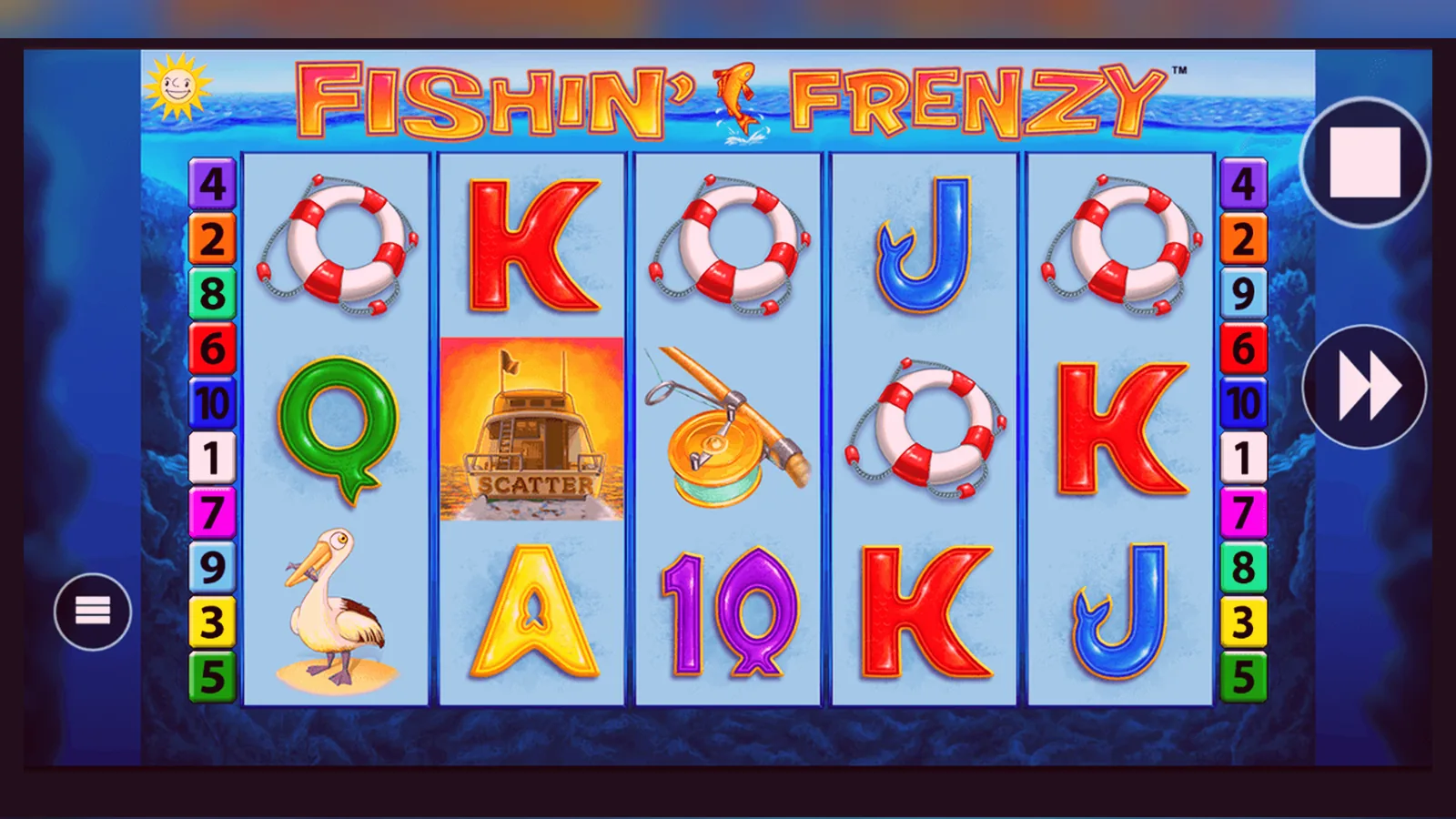
- The reel screen: Five reels, ten paylines, a cartoon harbour background, fish and bobber symbols. The stake selector sits at the bottom, bounded by the £5 per-spin cap (or £2 if you're 18–24). Balance, bet, and win counters are always visible. A menu icon in the corner opens the paytable and rules.
- Paytable and rules: Tap the «i» icon and you get a multi-page overlay: symbol values, how the free-spins feature works, RTP, max win, and a link to the provider's fair-play certificate. This is where you confirm you're playing the real game, not a re-skinned clone.
- Account and limits screen: Accessed from the casino's top menu, not the game. Here you set deposit limits, session reminders, and loss limits. UKGC sites must show you this screen during onboarding. If you deposit £150 or more in a month, the operator will run a soft affordability check using credit-reference data; higher deposits trigger stricter checks.
Step-by-Step Install: Browser, Home Screen, and App
Here's how to get Fishin Frenzy running on your phone, broken down by method. Each path assumes you've already registered with a UKGC-licensed casino and passed age verification.
- Browser (iOS and Android): Open Safari or Chrome. Go to your casino's .co.uk domain. Log in. Tap the menu or search icon, type «Fishin Frenzy», tap the tile, tap «Play». The game loads in the browser window. To go full-screen, rotate your phone to landscape and tap the expand icon. Done. No install, no permissions.
- Add to home screen (iOS): In Safari, with the casino site open, tap the share icon (square with an arrow). Scroll down, tap «Add to Home Screen». Edit the name if you like, tap «Add». A new icon appears on your home screen. Tap it and Safari opens straight to the casino lobby. You still need to log in each session unless you've ticked «Remember me».
- Add to home screen (Android): In Chrome, open the casino site. Tap the three-dot menu, choose «Add to Home screen» or «Install app» (wording varies by Chrome version). Tap «Add». Chrome creates a shortcut. Tapping it opens a borderless browser window that feels like an app but is still the website.
- Operator app from App Store (iOS): Open the App Store, search for the casino's name (e.g. «Paddy Power Casino», «Betfair Slots»). Check the developer field matches the brand. Tap «Get», authenticate with Face ID or your passcode, wait for the download (60–120 MB is typical). Open the app, log in, navigate to «Slots», find Fishin Frenzy, tap the tile. The app is just a native wrapper around the same HTML5 game.
- Operator app from Google Play (Android): Open Google Play, search for the casino app, verify the developer name, tap «Install». Grant the requested permissions (usually «Storage» and «Notifications»). Open the app, log in, go to the game lobby, search for Fishin Frenzy. Same experience as the iOS version.
- APK sideload (Android, high risk): Only do this if the casino doesn't have a Play Store app and you trust the source. On the casino's website, find the APK download link (usually in the footer or a «Mobile» page). Download the .apk file. Open «Settings» → «Security» → enable «Install unknown apps» for your browser. Tap the downloaded file in your notifications or file manager, tap «Install». Once installed, disable «Install unknown apps» again. Open the app and log in.
App Details: What You'd See in a Store Listing
Fishin Frenzy itself doesn't have a store listing, but if it did — or if you're looking at a casino app that includes it — here's the kind of card you'd see. These are plausible, representative figures, not an endorsement of any one operator.
The «In-App Purchases» line is required by Apple and Google when an app handles real money. You're not buying game currency; you're depositing into your casino balance using a debit card, PayPal, Apple Pay, or Open Banking. Withdrawals go out via Faster Payments (same day to two working days) or e-wallets (a few hours to 24 hours), after KYC checks. The first withdrawal takes 24–48 hours while the operator reviews your documents.
What the App Actually Does, and What It Doesn't
A casino app that hosts Fishin Frenzy is a lobby browser, a payment gateway, and a session manager. It doesn't manipulate RTP, it doesn't let you play offline, and it doesn't store your balance on the device. Here's the reality:
- Game hosting: The app loads HTML5 games from the provider's content-delivery network. Fishin Frenzy runs in a WebView (iOS) or Chrome Custom Tab (Android). The maths, RNG, and reel strips live on the provider's server, not your phone.
- Payments: The app connects to the operator's payment processor. You can deposit using a debit card (Visa or Mastercard), PayPal, Apple Pay, or Open Banking. Credit cards have been banned for gambling since 2020. The payment method must be in your own name.
- Session tracking: The app enforces deposit limits, loss limits, and session reminders you set in your account. If you're 18–24, the £2 stake cap is applied at the server level; the app just reflects it. Affordability checks start from £150 net deposits a month, using credit-reference data at the first stage.
- Push notifications: The app can alert you to new bonuses, free-spin offers, or responsible-gambling reminders. You control these in the app settings. Some players turn them off immediately.
- Offline mode: There isn't one. Slots are server-based; your phone is a thin client. If you lose signal mid-spin, the result is held on the server and appears when you reconnect. Your balance and bet history are always server-side.
Spotting Fakes, Clones, and Dangerous Permissions
Fake casino apps are common, especially on Android. They mimic the look of a real game, promise big wins, ask for payments via cryptocurrency or gift cards, and vanish with your money. Here's how to tell a legitimate Fishin Frenzy experience from a clone:
- Developer name: In the App Store or Google Play, check the developer field. It should match the casino brand (e.g. «Entain», «Flutter Entertainment», «Rank Group»). If it says «Fishin Frenzy Official» or «Mega Slots Games Ltd», it's fake.
- UKGC licence: Open the app, scroll to the footer or «About» page, look for a licence number (format: 000-000000-R-000000-000). Cross-check it in the UKGC register at gamblingcommission.gov.uk. If there's no licence number, or the number doesn't match the operator, stop.
- Payment methods: Legitimate UK casino apps accept debit cards, PayPal, Apple Pay, and Open Banking. If the app asks for Bitcoin, Ethereum, gift cards, or wire transfers to a personal account, it's a scam.
- Domain: The app should link to a .co.uk or .com domain that matches the casino brand. If it redirects you to a .xyz, .bet, or numeric IP address, it's fake.
- In-app purchases: Real casino apps list deposit amounts (e.g. £10.00, £50.00) in the App Store or Play Store «In-App Purchases» section. Fake apps sell «coin packs» or «VIP tokens» that have no cash value.
- Permissions: Legitimate casino apps need «Storage» (to cache games) and «Notifications» (for bonuses). They do not need «Contacts», «Camera», «Microphone», «Phone», «SMS», or «Location». If you're asked for these, deny them or uninstall the app.
- Reviews: Check the app's reviews. Fake apps have thousands of five-star reviews posted in broken English on the same day, or one-star reviews saying «I deposited £100 and the app vanished». Real casino apps have a mix of ratings and detailed complaints about KYC times or slow withdrawals — boring, specific issues.
If you've already installed a suspicious app, uninstall it, change your casino password, and check your bank statement. Report the app to the App Store or Google Play using the «Report» link on the listing page.
FAQ
Do I need a separate app to play Fishin Frenzy, or can I use a browser?
You don't need a separate app. Fishin Frenzy runs perfectly in Safari or Chrome on any modern phone. Browser play uses no storage, requires no permissions, and is just as fast as an app. The only advantage of a casino app is one-tap access from your home screen and push notifications for bonuses — but you can achieve the first by adding the casino site to your home screen, and the second isn't worth it for most players.
I'm 22. Why is my max bet £2.00 when the game shows a £5.00 cap?
Under UKGC rules, slot stake caps are £5.00 per spin for players aged 25 and over, and £2.00 per spin for players aged 18–24. The cap is enforced at the server level as soon as you set your date of birth during registration. When you turn 25, the cap lifts automatically. It's not a bug; it's harm-minimisation policy.
What's the difference between «Add to Home Screen» and downloading a casino app?
«Add to Home Screen» creates a shortcut to the casino's website; tapping it opens the site in a browser. A casino app is a standalone program downloaded from the App Store or Google Play, with a native interface and push-notification support. Both load the same HTML5 version of Fishin Frenzy, so gameplay is identical. The app uses 60–120 MB of storage; the home-screen shortcut uses none.
Is it safe to download an APK if the casino doesn't have a Google Play app?
It's risky. APK files bypass Google Play's malware scanning, and fake APKs are a common malware vector. Only download an APK if the link is on the casino's official .co.uk domain, the site is UKGC-licensed, and you've checked the SSL certificate (tap the padlock in your browser). After installing, disable «Install unknown apps» in Android settings. If you have any doubt, stick to browser play.
How do I know I'm playing the real Fishin Frenzy and not a clone?
Open the game, tap the menu or «i» icon, and check the paytable screen. It should name the provider (Blueprint Gaming or Reel Time Gaming), show an RTP of 96.00% or 96.12%, and include a fair-play certificate or link to the provider's site. Check that the casino has a UKGC licence number in the footer and that the number appears in the UKGC register. If any of these are missing, or the paytable looks generic, you're on a clone.
What happens if I start a spin and lose my internet connection?
The spin completes on the server. When you reconnect, the result appears on screen and your balance updates to reflect the win or loss. Server-based slots can't be interrupted by a dropped connection; the RNG has already picked the outcome the moment you pressed spin. If you're worried, check your bet history in the casino's «My Account» section — every spin is logged with a timestamp and result.